
Play in Match Exchange — Official Open Bets Sorted Into All, Matched and Unmatched
Tap Exch, the first icon on the PlayinMatch bottom bar, and you are on Play in Match Exchange: two price columns for cricket, soccer and tennis, a slip that waits until another player takes it, and an Open Bets screen that files every bet under All, Matched or Unmatched.
Play in Match Exchange on PlayinMatch — Where the Official Exch Tab Lives
Short answer: tap Exch. That is the first of five tabs along the bottom of the PlayinMatch app (Exch, Sports, Home, In-Play, Account), and it opens the exchange board for whatever is running today.
One row per team or player, two price boxes beside each name, a market heading on top: that is the Exch board on PlayinMatch in one line. Tap a box and the slip opens with that figure already sitting in the Odds field. Arriving through the side menu instead? The matching entry is Exchange - InPlay, not the sportsbook one below it.
Tonight's fixtures decide the board. Say an IPL game, a Big Bash match and a Ranji Trophy day overlap: all three show under cricket on the PlayinMatch exchange, with soccer and tennis stacked below. A thin week gives you bilateral Tests, ODIs and T20Is, or PSL, CPL and Sheffield Shield instead. Every one of those prices starts shifting once play begins. Hence the In-Play label.
A small shortcut: check the counters on the PlayinMatch home screen before you open Exch. If the Tennis counter reads zero, the tennis part of the exchange board is going to be empty as well, and you have saved yourself a tap. On events that carry a live stream, the pictures and the PlayinMatch prices share one screen, which beats flicking to a second app for the score.
Exch (bottom menu) or Exchange - InPlay (side menu) on PlayinMatch.
Cricket leads the board; soccer and tennis sit under it on the same PlayinMatch screen.
The 21 Dec 2024 notice says Playinexch.com became PlayinMatch; the exchange came across with the same login.
If the Exch tab will not load at all, it is usually the address and not your account. Betting addresses get blocked in India now and then, and when that happens the same PlayinMatch ID opens on the next working address with nothing lost. Our PlayinMatch login page keeps the current sign-in route in one place.
PlayinMatch Bet Slip Anatomy — Every Field on the Official Exch Slip, Clearly Named
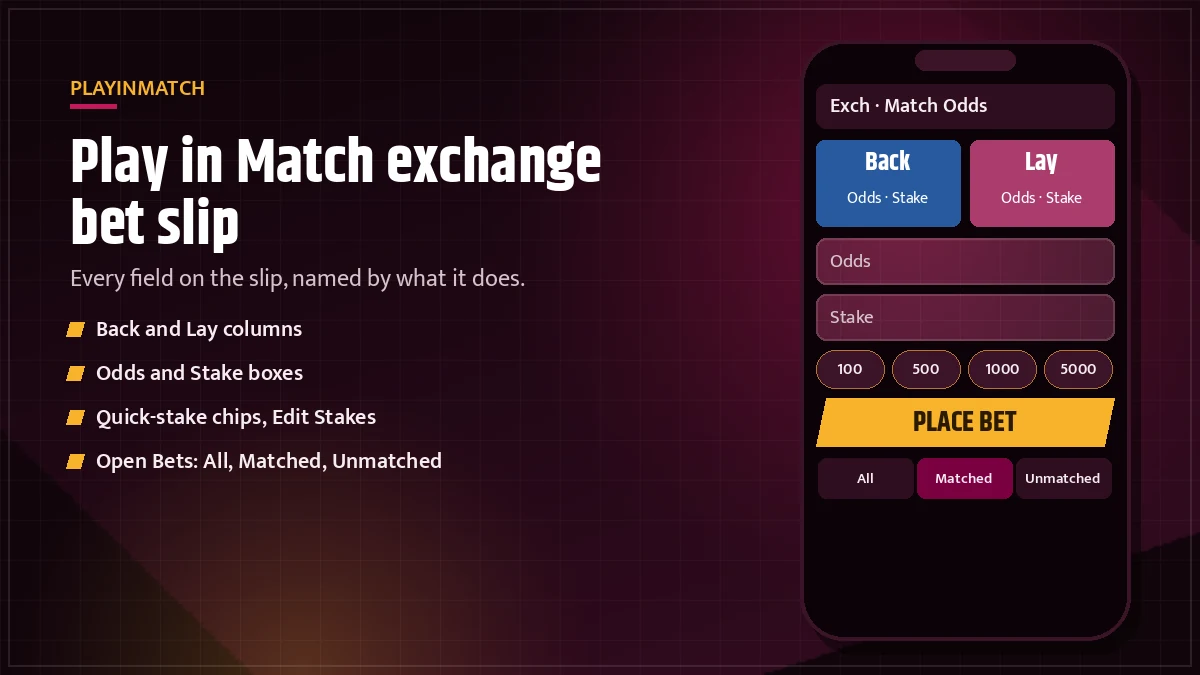
Tap any price on the PlayinMatch exchange and a slip slides up. It looks busy the first time. It is not, once you know what each box is for.
- Odds: the price you tapped, already filled in. You can nudge it before you place; if you ask for a price nobody is offering yet, the slip will sit in Unmatched.
- Stake: the amount you are putting down. Type it, pick a chip, or leave the default stake you saved in settings.
- Profit: shown on a slip from the first column. PlayinMatch works it out from odds and stake as you type.
- Liability: the label that replaces Profit when the slip comes from the second column. Same slot on the slip, different job: it shows what that slip can cost you.
- Quick Stakes: preset chips that drop an amount into Stake in one tap. Edit Stakes lets you change the numbers on them.
- Keypad: the on-slip number pad, so the phone keyboard never covers the prices.
- Minimum stake line: a small line that states the lowest stake for that market. Go under it and PlayinMatch lifts your figure and tells you the stake was updated.
FancyBet slips wear the same frame with different labels: a Yes column and a No column, a Runs/Odds box in place of plain Odds, then Stake and the result line. There is also a Bet Info link on the slip, handy when you want the market rules before you commit. (Most people skip it. Probably a mistake on a new FancyBet line.)
One thing the PlayinMatch slip does not do is guess for you. If the figure in Profit looks odd, the stake or the odds box is off, so fix the input instead of re-tapping the price.
PlayinMatch Open Bets — 3 Live Lists, Cancel All and Fast Cancelling
Every slip you send ends up under Open Bets, and PlayinMatch splits that screen three ways.
All is the full pile: everything you placed that has not settled yet, matched or not. Matched narrows it to bets that found the other side; you will have seen a short "Bet Matched" message when that happened. If a slip is not in All, it was never placed, so that is the first list to check when you are unsure.
Unmatched holds the slips still waiting at your price. This is the only list where cancelling works, and it carries the Cancel All button for clearing every waiting slip in one go.
Bets are grouped by market, so a line reads something like "England v Sri Lanka - Match Odds" with your slips stacked under it. Handy on a double-header day, when two games and a FancyBet line can all be open on the same PlayinMatch account.
Cancelling a single bet takes about as many taps as placing one:
- Open the Exch tab and tap Open Bets.
- Switch to the Unmatched list. The slip will not show a cancel option under Matched.
- Find the market heading and tap Cancel on the slip you want gone, or press Cancel All to clear every unmatched slip on that screen.
- Check that the slip has dropped out of Unmatched and out of All. The held stake goes back to your PlayinMatch balance.
That is the theory. In practice the price can get matched while your thumb is on the way to Cancel, especially during a live over, and then the slip is simply in Matched and stays there. PlayinMatch does not reverse a matched bet from this screen. So if you are going to cancel, do it early rather then hoping to beat the next ball.
Unmatched Bets on PlayinMatch — Keep Them Live With the Trusted At In-Play Option
An unmatched bet is a slip PlayinMatch has accepted but nobody has taken yet.
Before the start, a waiting slip gives you two choices on PlayinMatch: cancel it, or keep it At In-Play. Keep it and the slip carries on waiting after the first ball is bowled, now inside the in-play market, instead of being cleared off when the match goes live.
Why would anyone keep one? Usually because the price they asked for is more likely once the game moves. Whether that is sensible is your call; the PlayinMatch exchange just gives you the switch. Leaving a slip At In-Play also means it can get matched while you are away from the phone, so glance at the Unmatched list at the innings break. A typical case: a slip placed during the toss at a price nobody was offering, left At In-Play, and matched in the fourth over while its owner was away making tea.
A slip sitting there for a long time is not a fault. It means no one has met the price. Change the odds by cancelling and placing a fresh slip, or leave it. The most common "stuck bet" message the desk sees is probably just this: an unmatched slip that was never going to match at that number.
If something looks genuinely wrong (a slip missing from all three lists, say, or a stake that did not come back after Cancel All), take a screenshot of Open Bets with the market name showing and send it through live chat, which is the main support line inside the official PlayinMatch app. The ID desk answers 24x7, and a screenshot with the market heading saves a round of questions.
Play in Match Exchange — Official PlayinMatch Keyword Map
Searches for this tab usually start with the brand in one of its spellings: PlayinMatch, Play in Match, PlayinMatch99 or PlayinMatch 99. All four reach one account. PlayinMatch 247 does too, because plenty of players still type the 247 address from before the rename.
PlayinMatch Online and Mobile Access
PlayinMatch online and Play in Match online mean the browser lobby; the PlayinMatch com mobile paths open the phone version, and the PlayinMatch com mobile login is the same email-or-username screen as Play in Match login anywhere else. The PlayinMatch app, the PlayinMatch live app and a PlayinMatch app download all end on that sign-in too. Anyone searching PlayinMatch install, PlayinMatch APK or a PlayinMatch app download APK old version should take the file from the official ID desk only, not a lookalike listing.
PlayinMatch Games Beside the Exchange
Every PlayinMatch game shares the exchange balance: Play in Match casino tables from Evolution and Ezugi, PlayinMatch com slots, PlayinMatch Aviator from Spribe and Play in Match Ice Fishing. For scores, PlayinMatch online live sports and PlayinMatch live score today follow cricket, soccer and tennis while the Play in Match Exchange keeps its prices moving.
Join PlayinMatch With Verified Support
To join PlayinMatch, ask the desk for an ID and confirm the 6-digit OTP. PlayinMatch withdrawal time is usually 2-3 hours by method, the PlayinMatch customer care number answers on the care page, and the question is PlayinMatch safe gets its own full page.
PlayinMatch Exchange Settings — Default Stake, Odds Highlight and Accept Any Odds, Made Easy
Settings on PlayinMatch sit under the Account tab, and four of them change how the exchange slip behaves.
Whatever you save here fills the Stake box on every new PlayinMatch slip. Set it to your usual amount and a bet becomes tap price, tap Place. Leave it empty and you type each time.
The chip row on the slip. Edit Stakes swaps the preset figures for your own, and they stay saved on the account, so they follow you from phone to browser.
Turn it on and a price that moves flashes on the board. On a live over this is the difference between noticing a move and placing at a price that is already gone.
With this on, a FancyBet slip goes through even if the Runs/Odds figure shifts between your tap and the send. With it off, a shifted line bounces the slip back to you.
The same idea for Binary markets on PlayinMatch, with its own separate switch.
Two bonus questions share that settings page: "Receive all bonuses?" and, for casino play, "Remove wager bonus?". They do not touch how an exchange slip gets matched. I mention them only because people open settings looking for the odds switch and wonder what those two are.
Accept Any Odds is the setting to think about twice. It saves a rejected slip; it also means you take the line as it is at send time.
Play in Match Exchange Markets — Match Odds, FancyBet, Binary and MultiMarket Live
The PlayinMatch exchange runs four kinds of market, and each has its own slip quirks.
| Market | What the slip shows | Setting that applies |
|---|---|---|
| Match Odds | Two price columns per team or player; Odds, Stake, then Profit or the second-column label | Default stake, Quick Stakes, odds highlight |
| FancyBet | Yes and No columns with a Runs/Odds box | Accept Any Odds |
| Binary | A price that can move before your slip lands | Accept Any Price |
| MultiMarket | Several markets on one screen | Whatever each market uses |
Most PlayinMatch users begin on Match Odds. Its heading carries the fixture, for example "England v Sri Lanka - Match Odds", and the market does not shut at the toss: it rolls straight into in-play and reprices wicket by wicket. Tennis Match Odds on PlayinMatch work the same way, player against player, across Grand Slams, ATP Masters 1000 and 500 events, WTA 1000, the Davis Cup and the Billie Jean King Cup, down to Challenger and ITF draws on a slow week.
Soccer follows the same two-column Match Odds layout, with a draw line added. On PlayinMatch you will see it most for the Premier League, La Liga, Serie A and Bundesliga through the season, the Champions League and Europa League midweek, and the World Cup or Euros in a tournament summer.
FancyBet is the cricket-heavy one. Instead of picking a winner you answer a Yes/No line, and the Runs/Odds box tells you the number the line is built on. Since those numbers move quickly during an over, FancyBet is also the market where the Accept Any Odds switch matters most.
MultiMarket is less a market than a view. Pin a few markets and PlayinMatch lays them on one screen, so a Test match and a Premier League game can be followed together without flicking between pages. You get to it from the side menu. Want the score while you watch? Our PlayinMatch live score today page covers that side.
PlayinMatch Exchange vs Sportsbook Tab — Two Official Ways to Price the Same Match
Same PlayinMatch ID, same balance, two different screens.
Exchange (Exch): prices in two columns, slips matched between players, an Unmatched list, Cancel and Cancel All, At In-Play, FancyBet, Binary and MultiMarket. You can ask for a price and wait for it on PlayinMatch.
Sportsbook (Sports): reached from the Sports tab or Sportsbook - InPlay in the side menu. You take the price shown, and there is no Unmatched queue to watch. Simpler, fewer settings to learn.
Neither one is the "real" PlayinMatch. They are simply built for different habits. If you like naming a price and being patient, the exchange suits that. If you want to tap and be done, the Sports tab is shorter.
One practical note: open bets from the two tabs are not shown in one combined list. A sportsbook bet will not appear under the exchange Open Bets, so when you think a slip has vanished, check the other tab first. For the wider in-play board across both, see PlayinMatch online live sports.
Play in Match Exchange on Your Phone — Fast Mobile Slip, Minimum Stake Line and a Free ID
The PlayinMatch exchange was built phone-first, and you notice.
The slip opens from the bottom of the screen with its own keypad, so the prices above it stay visible while you type. Quick Stakes sit in a row you can reach with a thumb. Open Bets is a tap away on the same Exch tab. On a desktop browser the PlayinMatch lobby shows the same phone-shaped layout down the left side, which is why the slip looks identical on both.
About limits. The one limit PlayinMatch prints on every slip is the minimum stake line, and it belongs to the market you opened, so read it there instead of trusting a figure from somebody's screenshot. Type a stake under it and the slip raises the amount to the minimum and shows a note that your stake has been updated. Nothing is placed untill you press Place. Other caps, where a market has them, show up the same way: on the slip, at the moment you try.
Placing anything on the exchange needs a PlayinMatch ID, and getting one is a short loop. Name, email, +91 mobile and a password go in first; a 6-digit OTP then lands on that phone, and Continue finishes it. Shortly after, the account is live and the Exch tab will take your first slip. For the browser version of the lobby and it's sign-in, see the Play in Match online page. The ID desk link is right below.
Locked out halfway through a match? Forgot Password ? sits on the PlayinMatch login screen and works off the same kind of OTP as sign-up, sent to the registered phone number or matched to your username. Set the new password, tap Confirm, and you are back on the Exch tab under the same ID. If the code is slow, let the Resend timer finish before asking for another one; hammering the button just queues more codes.



Play in Match Exchange FAQ — Clear Official Answers
What is Play in Match exchange?
Play in Match exchange is the part of PlayinMatch where a bet needs a second player to take the other side. Tap Exch on the bottom menu, choose a cricket, soccer or tennis market, and every slip you place moves through the All, Matched and Unmatched lists under Open Bets.
How do I cancel a bet on PlayinMatch exchange?
Only unmatched PlayinMatch exchange bets can be cancelled. Go to Open Bets, pick the Unmatched list, then cancel one slip or use Cancel All for every waiting one. Once a slip moves to Matched the cancel option disappears, so on PlayinMatch the timing matters more than the taps.
What is an unmatched bet on PlayinMatch?
An unmatched bet on PlayinMatch is a slip that was accepted but has not yet found another player at your odds. It waits in the Unmatched list, where you can cancel it or keep it At In-Play so it stays open after the match goes live.
What is FancyBet on PlayinMatch exchange?
FancyBet is a PlayinMatch exchange market built on Yes and No columns instead of the usual two price columns. Its slip shows a Runs/Odds box, a Stake box and a result line, and the settings page carries an Accept Any Odds switch that applies to FancyBet only.
What is MultiMarket on PlayinMatch?
MultiMarket is the PlayinMatch side-menu entry, listed right after Exchange - InPlay and Sportsbook - InPlay, that gathers several markets onto a single page. A Test match price and a FancyBet line from another game can then sit together, so nothing needs reopening during play.
Is PlayinMatch exchange different from the sportsbook?
Yes. The PlayinMatch exchange lists prices in two columns and matches your slip with another player, so a bet can wait unmatched. The Sportsbook tab shows a price you simply take, with no Unmatched list to manage. Both run on one PlayinMatch ID and one balance.
What is the minimum stake on PlayinMatch exchange?
There is no single figure to quote, because the PlayinMatch exchange shows the minimum stake as a line on each market slip. Check it there before tapping Place. Enter a smaller amount and PlayinMatch bumps your stake up to that minimum, with a short note saying the stake was updated.
Play in Match Exchange Searches — Popular Official Variants
- play in match exchange
- playinmatch exchange
- playinmatch exchange login
- play in match exchange app
- playinmatch unmatched bet
- playinmatch fancybet
- playinmatch multimarket
- playinmatch bet cancel kaise kare
- playinmatch exchange minimum stake
- playinmatch open bets
- play in match exchange cricket